Monday, March 06, 2006

Lexmark C524n


Lexmark C524n combines excellent text, decent graphics and photos, and the fastest performance for business applications of any color laser printer in its price class. It offers 350 sheets Input Capacity, 65000 pages per month Duty Cycle, 20 ppm rted speed, Measuring 19 by 17.3 by 16.1 inches (HWD) and weighing 57 pounds.
Good side from this printer, Excellent performance for business applications. Excellent text quality. Includes Ethernet connector. And bad side from this printer, Despite being more than acceptable for internal business use, the graphics quality is relatively low for a color laser printer.

Sunday, February 26, 2006

Ricoh Aficio G7500


Ricoh Aficio G7500 is laser-class printer with commensurate speed and quality for paper up to 12 by 51 inches. This printer features, 20 ppm Rated Speed (Color), Supertabloid Maximum Paper Size, 10000 pages per month Duty Cycle, 250 sheets Input Capacity, What is good side from this printer ?Laser-class speed and quality. Output up to banner size (12 by 51 inches). Duplexing standard. and bad side from this printer , Network adaptor is optional and external. Graphics in default mode show banding, limiting the mode's usefulness.

Sunday, February 19, 2006

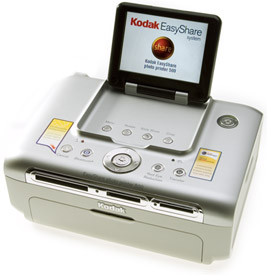
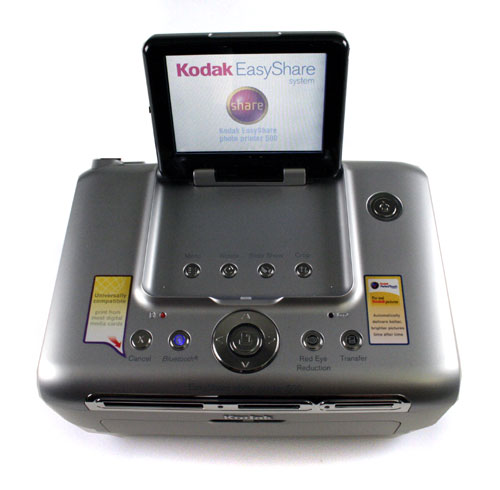
Kodak EasyShare photo printer 500


Kodak EasyShare photo printer 500 prints high-quality 4- by 6-inch photos at reasonably fast speeds and from a wide range of sources. This printer features Thermal Dye Technology, 4" x 6" paper size, come with 1 Number of Cartridge, 3 Number of Ink Colors, you can directly print from your digital camera and other Media Slots: CompactFlash Type I, CompactFlash Type II, Memory Stick, Memory Stick Pro, Memory Stick Duo, Secure Digital, MultiMedia Card, xD-Picture Card. This printer come with Lcd Preview Screen before you print your photos.
what good side from this printer?, Prints from cameras, memory cards, USB keys, computers, Bluetooth phones, and PDAs. Includes 3.5-inch LCD for previewing photos. Bad side from this printer is Loses details in bright areas.

Friday, February 17, 2006

Konica Minolta PagePro 1400W


Konica Minolta PagePro 1400W , come with laser technology. This printer features,17 ppm rated speed, 9000 pages per month Duty Cycle, 150 sheets Input Capacity, and 3.3 cents cost per page. what is good side from this printer?, Small size and then Low cost, and Good speed for a personal printer and for the price. and then bad side from this printer?, Low input capacity, at 150 sheets maximum. Below-par output quality.


Monday, February 13, 2006

Canon Pixma MP950 Photo All-In-One


Canon Pixma MP950 Photo All-In-One can function as a copier, a flatbed scanner that can also scan slides, and a printer that combines fast performance with high-quality output. This printer also can print from digital camera, memory cards, slides, and negatives without a computer.
The front panel offers a 3.6-inch LCD for previewing photos and an impressively well-designed set of controls and menus that enable photo-kiosk-like adjustment of the process. Options include automatic image optimization, brightness adjustment, cropping, and more.
MP950 uses seven inks, with a separate cartridge for each color: cyan, yellow, magenta, light cyan, light magenta, and two versions of black, one pigment-based and the other dye-based. This printer come with 3200 ppi Scanner Optical Resolution, 8.5 x 11.7 inches maximum scan area.
You can but this printer for $499 .

Thursday, February 09, 2006

How to Choose the Right Paper for Your Printer

Of course you can print on any type of paper but don’t expect that the prints will turn out the way you expect them to be. Paper type is something you need to consider because the prints will depend on what kind of printing will be done. Checking on the specifications of the printer will make sure that you are getting the best out of your printer.

If you are printing draft, you can use a scrap paper so that you will not be wasting papers. Save the papers for final printing. You can pick a generic 20-lb paper if it is not that important. This type of paper does not cost too much because it is not made of high quality. For better paper type, you can buy a 24-lb up to 40-lb white paper which has a high ISO brightness if you are aiming for a print that is better than the ordinary if you are using an inkjet or laser printer. Select coated paper which is made for inkjet printers if you want to achieve laser printer quality or if you are printing graphics or colored pictures that you want to look nice.
If you want to really save on papers, you can choose recycled papers but do not expect that the prints will match your expectations. Recycled papers are really not a choice in printing with inkjet or laser printers because they are made of low quality materials and to think that they are “recycled” means that they have already been used.
For more related articles, you may visit http://www.printingshoppers.com

via dailyindia.com

Copy right @ 2005 Printer Blog - Printer Site Map